Xerox Fault Codes: How to Read the Chain Number
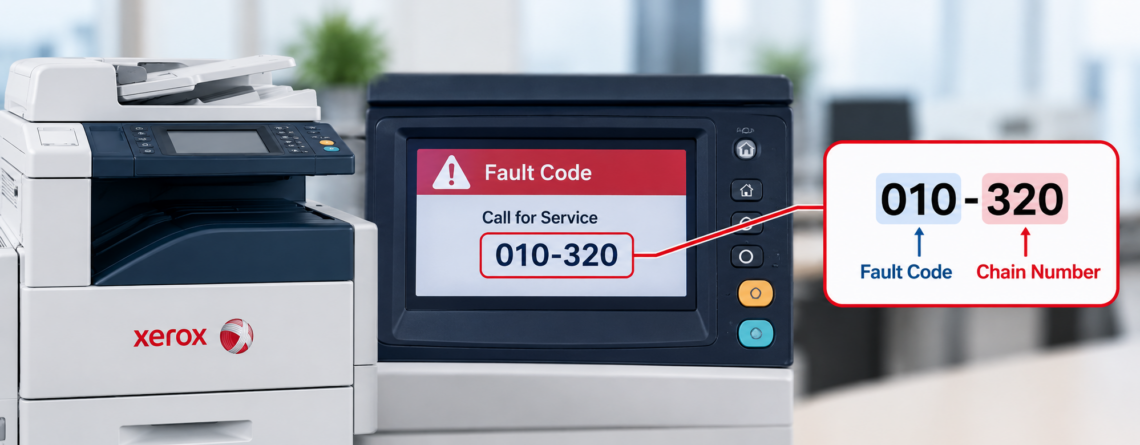
Xerox fault codes look like a phone extension — 010-321, 016-503, 093-324 — and that format is doing more work than most people realise. The first three digits tell you which part of the machine failed. Learn to read that one number and you can tell within seconds whether you are looking at a fuser problem, a paper tray problem, or a network setting that has nothing to do with the hardware at all. This guide explains Xerox’s chain-link system, gives the subsystem table from Xerox’s own documentation, and covers the codes we see most often on WorkCentre, AltaLink, and VersaLink machines.
How to read a Xerox fault code
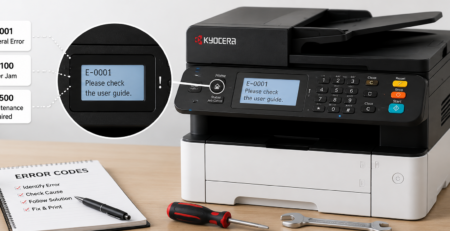
Xerox calls the format chain-link. The code comes in two groups of three digits, sometimes with a two-digit suffix after that.
The first group is the chain, and it identifies the subsystem. The second group is the link, which identifies the specific fault within that subsystem.
There is one quirk worth knowing. The chain number is really two digits. When the first group shows three digits, you ignore the leading digit. So 010 is chain 10, 016 is chain 16, and 112 is chain 12.
Once you know that, the first number alone tells you roughly what you are dealing with.
The chain table
These come from Xerox’s own fault code documentation. Not every chain appears on every machine, but the logic is consistent across the range.
| Chain | Subsystem | What that usually means for you |
|---|---|---|
| 02 | User Interface | Control panel |
| 05 | Duplex Automatic Document Feeder | The feeder, not the printer |
| 10 | Fusing | Technician. Often the most expensive group |
| 12 / 13 | Finishing / Booklet Maker | Stapler, sorter, booklet unit |
| 16 | Network Controller | Settings, not hardware. Scan and email faults live here |
| 17 | Network Connectivity | The network, not the machine |
| 19 | Image Processing | Often a job or driver issue |
| 20 | Embedded Fax | Fax line or fax settings |
| 42 | Drives and NOHAD | Motors and drive train. Technician |
| 62 / 65 | IIT and IIT CIS | The scanner unit |
| 71–75 | Paper Supply Trays 1 to 5 | The tray named by the number |
| 77 | Paper Transportation | Paper path |
| 89 | Paper and Image Registration | Alignment of image to page |
| 91 / 92 | Marking / Process Control | Imaging and calibration |
| 93 | Toner and Developer Dispense | Toner supply and developer |
| 94 | Transfer | Transfer belt or roller |
The two most useful rows are 10 and 16. Chain 10 means the fuser, which is the group most likely to need a part. Chain 16 means the network controller, which almost never does.
Chain 16: the ones that are not a repair
If your code starts with 016, the machine is working. Something about the network, the mail server, or the destination settings is not.
These come up constantly on scan-to-email, and the pattern is the same one we described for Canon and Sharp machines. The copier is rarely the thing that changed.
| Code | Meaning | Where to look |
|---|---|---|
| 016-503 | SMTP server address resolution failure — the machine cannot turn the mail server’s hostname into an address through DNS | Check the SMTP and DNS settings. Xerox suggests entering the SMTP server by IP address instead of hostname to test |
| 016-504 | POP3 server not found | Verify the POP server address, and confirm the machine has the correct DNS server |
| 016-505 | POP3 login failed | Username and password for the mail account |
| 016-506 | SMTP login failure, on models that distinguish it | SMTP authentication credentials |
In practice these appear after a mail password changes, after a provider tightens its authentication requirements, or after a DNS or firewall change that nobody connected to the copier. Settings are changed through CentreWare Internet Services, which is the machine’s own web interface.
Xerox showing a code you cannot clear?
Effiservice provides on-site Xerox repair across Orange County on WorkCentre, AltaLink, and VersaLink machines, including equipment bought or leased elsewhere. Give us the full code and the model and we will usually tell you what it points to before attending.
Prefer to book online? Visit our Orange County copier repair page or contact us here.
Chain 10: the fuser group
These are the codes that most often mean a part. Xerox documents several distinct faults within the chain:
- Fuser thermal errors — a family of codes including 010-319, 010-328, 010-329, 010-331, 010-332, 010-338, and 010-344. Temperature outside the expected range, in the same way Canon and Sharp handle it
- 010-321 — a fuser nip fault on some models, where the fuser is not making proper contact
- 010-324 — fuser NVM fail, a memory or data fault on the fuser unit rather than a mechanical one
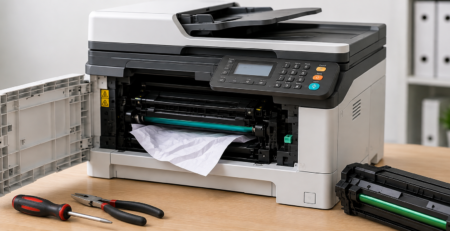
What you can safely do: power the machine off, wait ten minutes so the fuser cools, and power it back on. Check for paper wrapped around the fuser or debris in the paper path, and make sure the fuser unit is properly seated, since a unit that was disturbed during a jam clearance is a real cause. On some Xerox models the fuser is a customer-replaceable unit, which makes this group less expensive than it is on other brands.
What you should not do: keep restarting to push past a repeating thermal fault. These are safety shutdowns, and running a machine through them is how a thermistor becomes a fuser assembly.
The caveat that matters most
Xerox codes are not consistent across the whole range, and this trips up people working from generic lists.
The same code can mean different things on different machines. 010-321 is documented as a fuser nip fault on the Color C60 and C70, and as a fuser belt speed fault on the Color 800 and 1000 presses. 042-325 is a main motor fault on Versant presses and a yellow drum motor failure on Iridesse. Both are chain 42, drives, so the subsystem is right either way, but the specific part is not the same.
This is why the chain is more reliable than the full code when you are triaging quickly, and why the model matters as much as the code when you are ordering a part. If you find a code list online that contradicts the chain table above — and several do, including ones that place the fuser outside chain 10 — trust Xerox’s own documentation over it.
Finding the code and its history
You do not have to be standing at the machine. Xerox devices expose this through the Embedded Web Server, which you reach by entering the printer’s IP address in a browser on the same network. The Notifications section on the Home tab shows the current fault and the history.
That history is genuinely useful. A code that has appeared four times in a month and cleared itself each time is a different conversation from one that appeared this morning, and it is exactly the information that turns a guess into a diagnosis.
What to do before you call
- Write down the complete code, both groups of digits
- Note the exact model, because the same code differs across the range
- Read the chain. If it starts with 016 or 017, look at the network and settings before booking anyone
- Power off, wait ten minutes, power on once. Do not keep cycling
- Check the obvious physical things for the chain you are in — the named tray for 071 to 075, the feeder for 005, the finisher for 012
- Pull the fault history from the Embedded Web Server if you can
Most everyday problems never produce a code at all. Jams, streaks, and faded output are covered in our guide to common copier problems and how to fix them.
Codes arrive at the end of a process
A fuser fault is rarely sudden. Thermistors drift, rollers wear, and sensors foul gradually, and the code appears once the machine can no longer work around it.
That is the practical case for scheduled servicing on any Xerox that matters to your office. Cleaning the paper path, checking wear components, and reading the fault history catches the faults that have been recurring and clearing themselves. Our guide to copier preventive maintenance covers how often that is needed based on page volume, and our breakdown of copier repair costs covers what the common faults run to.
We service Xerox equipment throughout Orange County, including Irvine, Anaheim, Santa Ana, Huntington Beach, and Garden Grove, alongside the other brands in a mixed fleet. Our guides to Konica Minolta bizhub codes and Kyocera error codes cover the same ground for those machines.
Xerox Fault Codes FAQ
How do I read a Xerox fault code?
Xerox uses a chain-link format. The first group of digits is the chain, which identifies the subsystem, and the second group is the link, which identifies the specific fault. The chain is really two digits, so when the first group shows three digits you ignore the leading one. 010 is chain 10, fusing. 016 is chain 16, the network controller.
What does a code starting with 016 mean?
Chain 16 is the network controller, so the machine itself is working. These are settings, mail server, or network problems rather than hardware faults. They commonly appear on scan-to-email after a password change, a provider tightening authentication, or a DNS or firewall change nobody connected to the copier.
What does 016-503 mean on a Xerox?
SMTP server address resolution failure. The machine cannot turn the mail server’s hostname into an address through DNS. Check the SMTP and DNS settings in CentreWare Internet Services. Xerox suggests entering the SMTP server by IP address rather than hostname as a way to test whether DNS is the problem.
Which Xerox codes mean the fuser?
Chain 10. That includes a family of thermal errors such as 010-319, 010-328, 010-329, 010-331, 010-332, 010-338 and 010-344, plus faults like 010-321 and 010-324. Be careful with generic lists found online, because several place the fuser outside chain 10, which contradicts Xerox’s own documentation.
Can I clear a Xerox fuser code myself?
You can power off, wait ten minutes for the fuser to cool, and power on once. Check for paper wrapped around the fuser and make sure the unit is seated properly, especially after a jam was cleared. On some models the fuser is a customer-replaceable unit. What you should not do is keep restarting to push past a repeating thermal fault, since those are safety shutdowns.
Why does the same code mean different things on different Xerox machines?
Because the link numbers are assigned per model family. 010-321 is a fuser nip fault on the Color C60 and C70 but a fuser belt speed fault on the Color 800 and 1000. 042-325 is a main motor fault on Versant presses and a yellow drum motor failure on Iridesse. The chain is reliable across the range; the specific link is not.
How do I see the fault history on a Xerox?
Through the Embedded Web Server. Enter the printer’s IP address in a browser on the same network and look at the Notifications section on the Home tab, which shows the current fault and the history. A code that has recurred several times and cleared itself each time tells a technician far more than one that appeared this morning.
What is chain 93 on a Xerox?
Toner and Developer Dispense. Codes in that chain relate to the toner supply and developer system rather than to imaging or fusing, so they often point to a dispense motor or a supply problem rather than to a drum.
Does a 071 or 072 code mean the printer is broken?
Not usually. Chains 71 through 75 are paper supply trays one to five, so the code is naming a specific tray. Check that tray for a misfeed, paper loaded past the guides, damp or curled stock, or a tray not pushed fully home before assuming a fault.
Do you repair Xerox copiers in Orange County?
Yes. We provide on-site Xerox repair and maintenance across Orange County, including Irvine, Anaheim, Santa Ana, Huntington Beach, and Garden Grove, on WorkCentre, AltaLink and VersaLink machines and on equipment bought or leased elsewhere. Give us the full code and the model and we can usually identify it before attending. Call 714-331-5509.